New in MusEdLab

The Podium

Projectable classroom boards for music teachers. Drop a metronome, tuner, agenda, timers, and standards onto one screen, then project and teach.

Free for music educators · No credit card · Works on any projector or smart board

๐ŸŽš๏ธ Live metronome ๐Ÿ–ฅ๏ธ One-click Present
musedlab.ai/podium
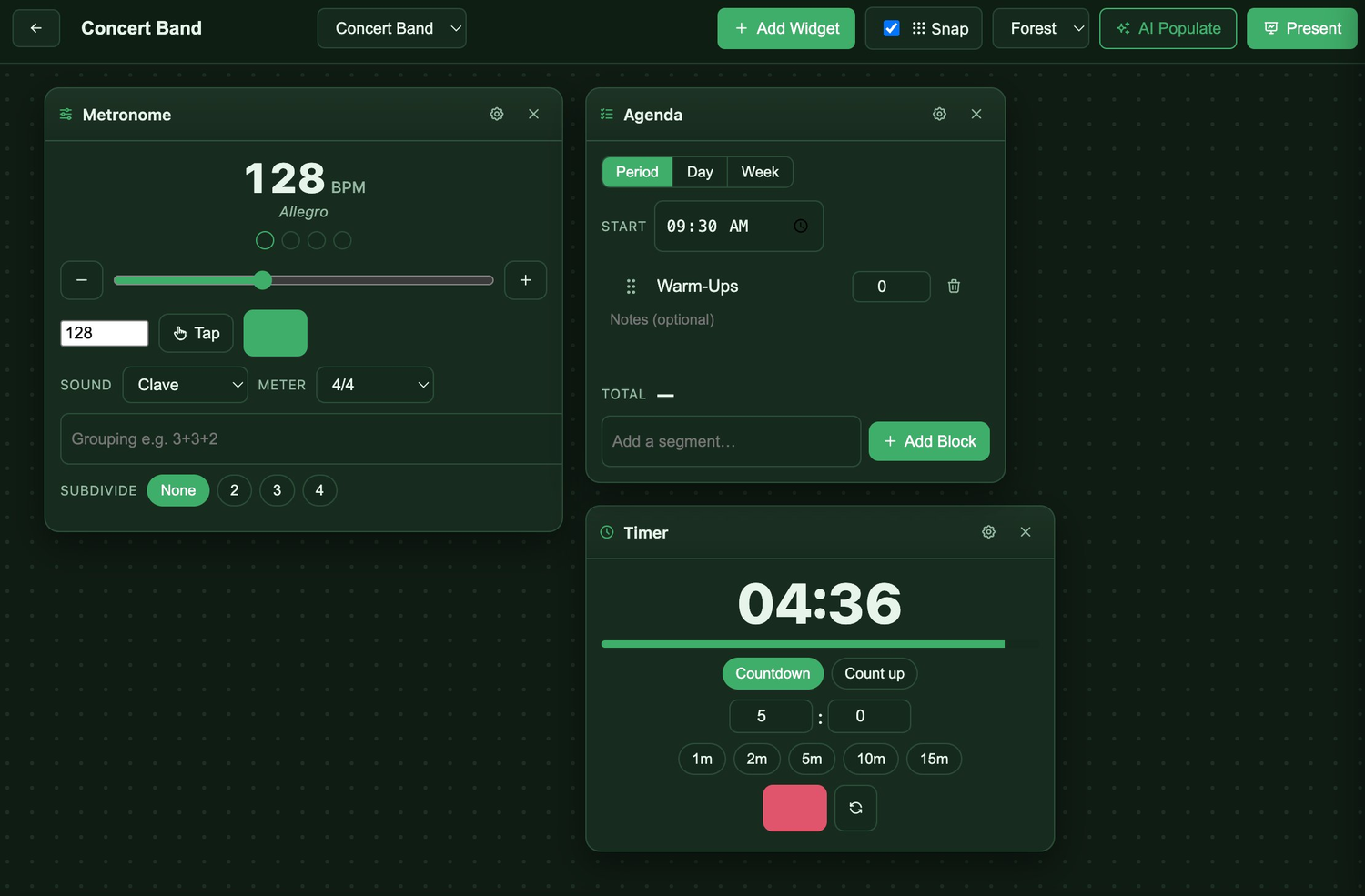
The Podium music classroom display board in edit mode showing a metronome at 128 BPM, an agenda, and a countdown timer on a projectable canvas
๐ŸŽต Built for music classrooms
๐Ÿงฉ Drag-and-drop widgets
๐ŸŽถ Live metronome and tuner
๐Ÿ–ฅ๏ธ Present in one click
๐ŸŽจ Themes to match your room
How it works

From blank canvas to projected in three steps

No setup, no template wrangling. Build the board your ensemble needs and put it on the big screen.

1

Create a board

Name it for your ensemble or period, pick a color theme, and you are ready to go.
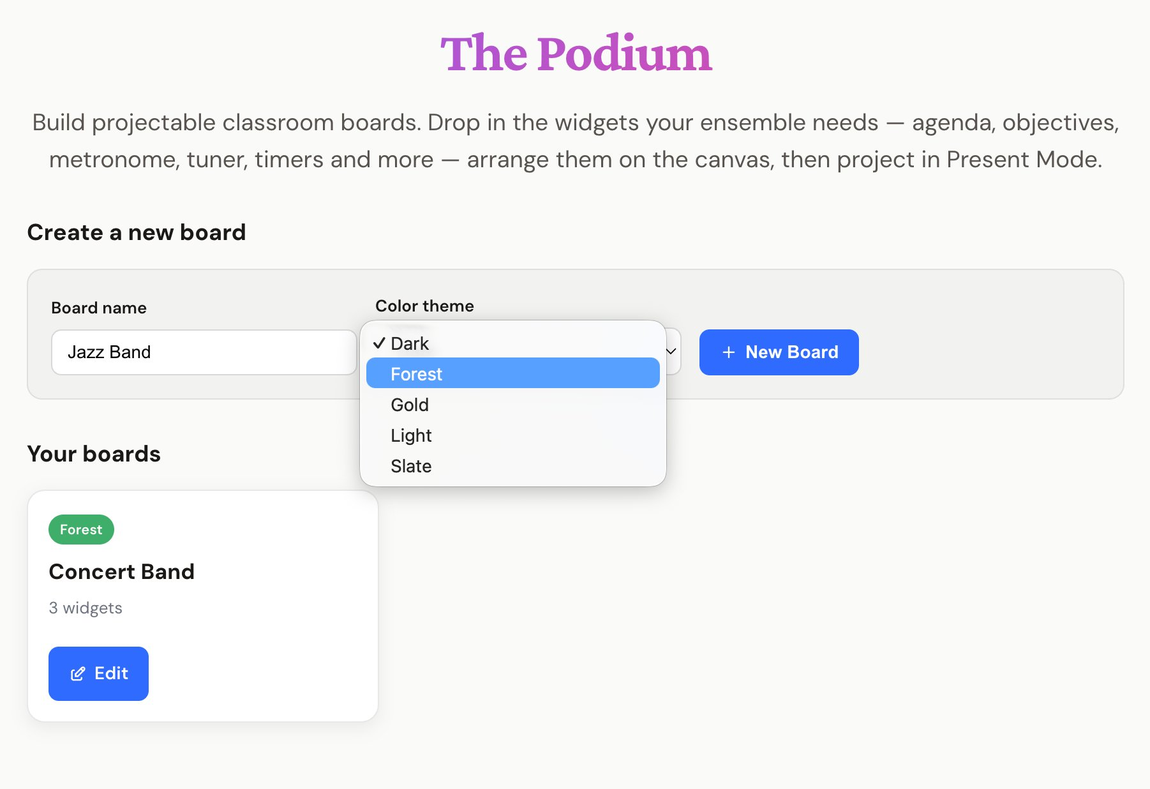
The Podium dashboard for creating a new music classroom board and choosing a color theme
2

Add your widgets

Drop in a metronome, tuner, agenda, objectives, standards, timer, calendar, or notes. Drag, resize, and snap to a grid.
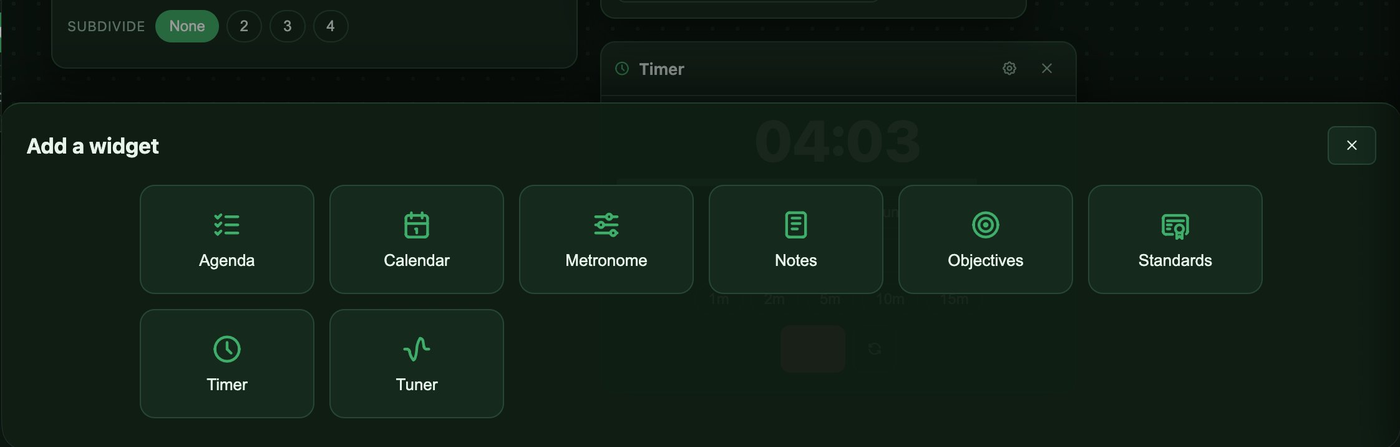
The Podium add a widget tray showing agenda, calendar, metronome, notes, objectives, standards, timer, and tuner
3

Hit Present

One click swaps to a clean, full-screen board your students can read from the back row. Exit just as fast.
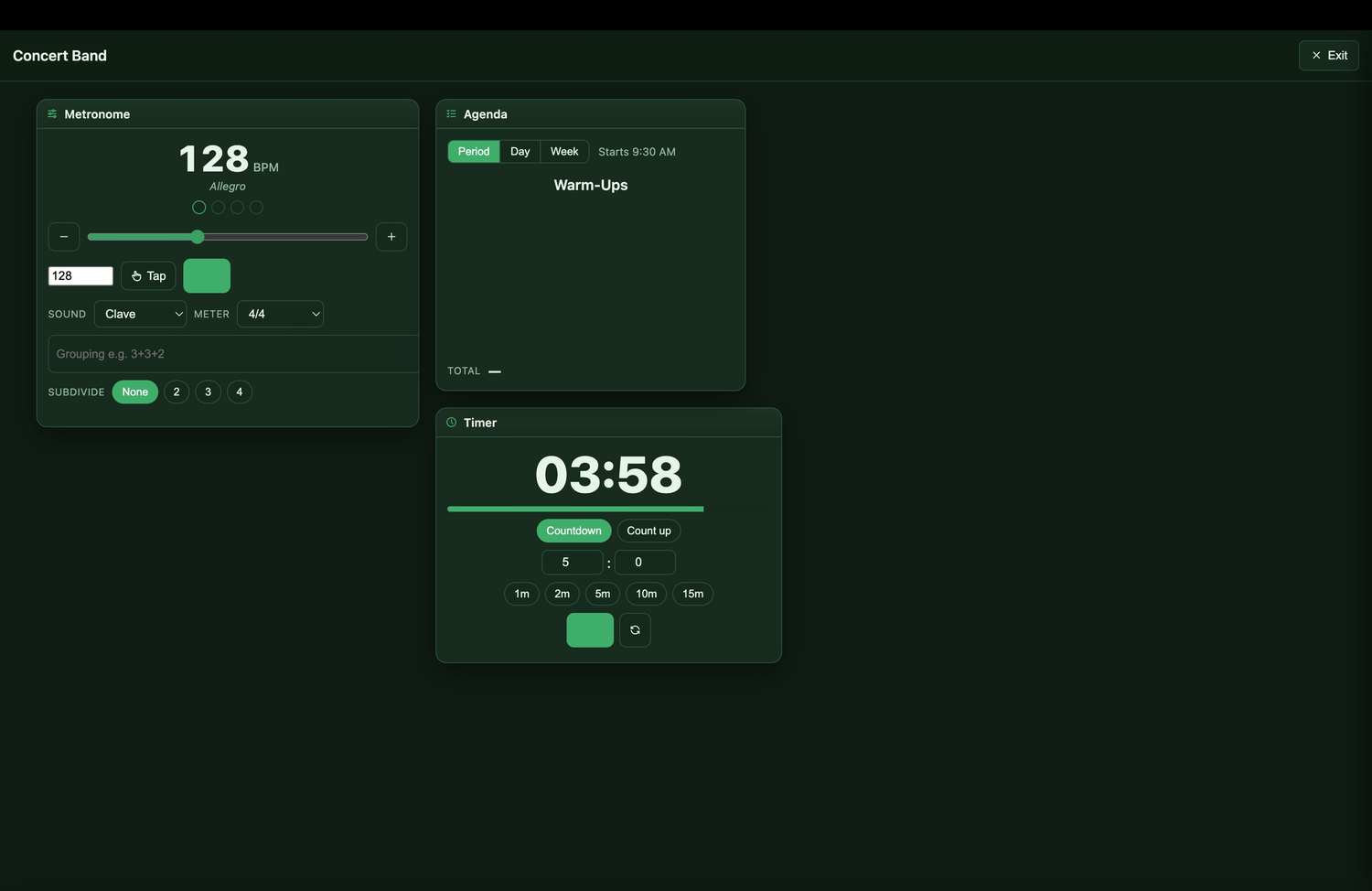
The Podium in Present Mode projecting a metronome, agenda, and timer full screen for a concert band class
The widgets

A toolkit made for the rehearsal room

Mix and match what you need today. Add a quick countdown for warm-ups, post the day's standards, or run the whole class from one screen.

๐Ÿ“‹

Agenda

Lay out your period, day, or week with timed segments students can follow along.

๐ŸŽฏ

Objectives

Post your "I can" statements so the goal of the day is always on screen.

๐Ÿ“œ

Standards

Show the standards you are addressing, ready for walkthroughs and observations.

๐ŸŽš๏ธ

Metronome

A real metronome with tap tempo, tempo markings, meter, and subdivisions.

๐ŸŽถ

Tuner

A live tuner your whole ensemble can read from across the room.

โฑ๏ธ

Timer

Count down warm-ups or count up sectionals with a big, readable display.

๐Ÿ“…

Calendar

Keep concerts, deadlines, and this week's plan in plain view.

๐Ÿ“

Notes

Drop reminders, seating changes, or anything you want front and center.

๐ŸŽต

Pitch Pipe

A clean reference pitch in any key for tuning a section or starting an a cappella warm-up.

๐ŸŽฒ

Section & Soloist Picker

Draw a soloist, a section to demo, or split the room into random practice groups.

โณ

Concert Countdown

Count the days to your next concert or festival in one big, motivating number.

๐Ÿ“ฑ

QR Share

Turn a link into a QR code students scan from their seats: a recording, a form, tonight's practice.

๐Ÿšฆ

Rehearsal Mode

Show the room the moment's mode: full ensemble, sectionals, individual, listen, or silent.

๐Ÿ’ก

Icebreaker

Music-themed conversation starters to open class, sorted by category and age level. Tap for a new one until you find the right fit.

โ–ถ๏ธ

Video

Embed a YouTube clip right on the board, distraction-free with no related videos, and expand it to fullscreen.

๐ŸŽง

Spotify

Embed a track, album, or class playlist to preview and explore. Sign in to Spotify for full songs.

๐Ÿงฉ

Embed

Drop in Google Slides, Canva, PowerPoint, Vimeo, or almost any web page with a single embed link.

Built for music, not borrowed from it

A metronome and tuner, right on the board

General classroom screens give you a clock and a timer. The Podium gives you the rehearsal tools you actually reach for, projected big enough for the back row to read.

  • Tap tempo, tempo markings, and a visual beat indicator
  • Time signatures, custom groupings, and subdivisions
  • A live tuner sized for the whole ensemble to see
  • Runs straight from the projected board, no second device
A live metronome at 128 BPM marked Allegro alongside an agenda widget on a projected music classroom board
Present Mode showing a distraction-free music classroom board with metronome, agenda, and timer
Present Mode

A clean board your class can read

When it is time to teach, hit Present. The edit tools disappear and your widgets fill the screen in a calm, focused layout. Everything stays live, so the metronome ticks and the timer counts while you run the room.

  • Full-screen, distraction-free layout
  • Widgets stay interactive while presenting
  • Exit back to editing in a single click
โœจ MusEdLab Pro

Build your board from a lesson plan

Already have your week planned? Upload a lesson plan or curriculum and AI Populate fills your Agenda, Objectives, and Standards widgets for you. Review, tweak, and present.
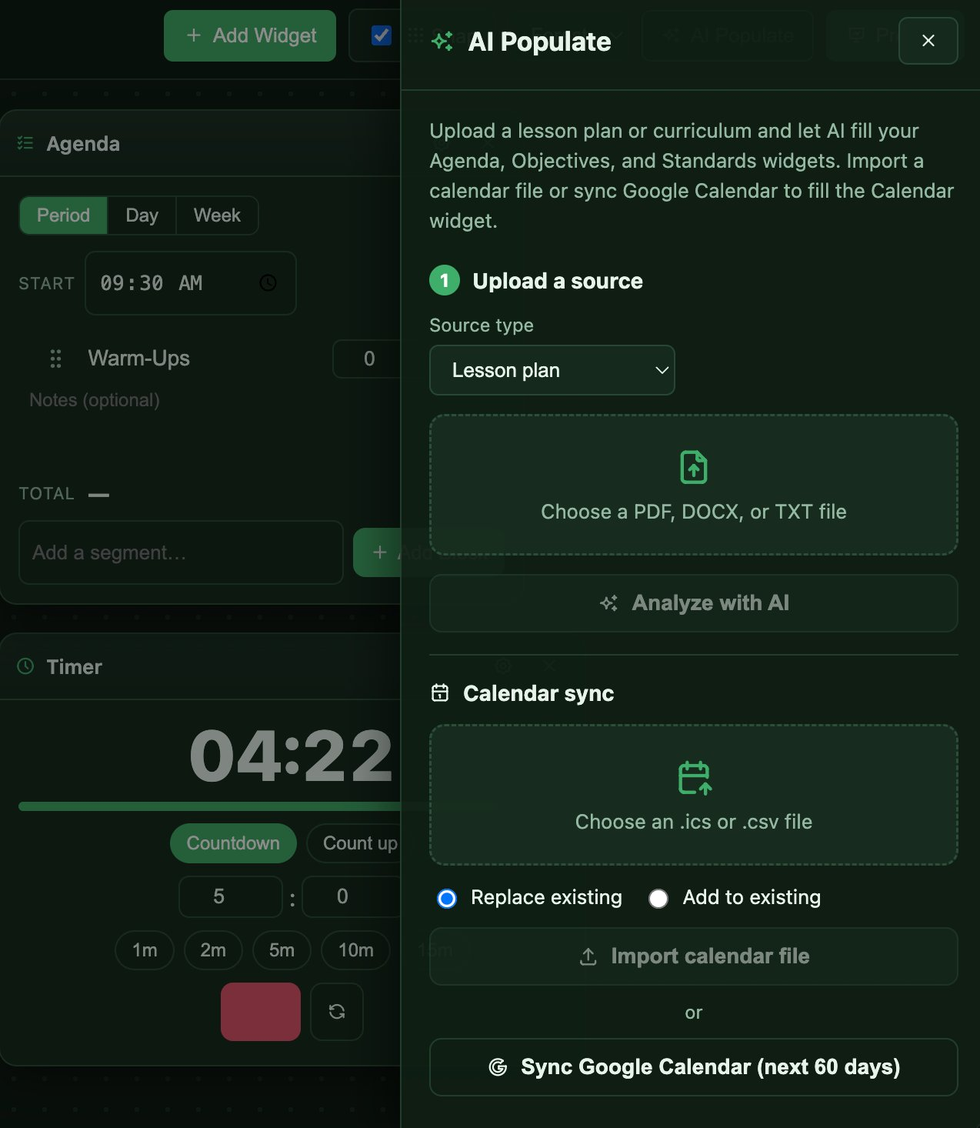
  • Turn a PDF, DOCX, or TXT plan into a ready-to-go board
  • Fill Agenda, Objectives, and Standards in one pass
  • Import an .ics or .csv calendar file
  • Or sync Google Calendar for the next 60 days
The Podium AI Populate panel for filling agenda, objectives, and standards from a lesson plan and syncing Google Calendar
Made to match your room

A theme for every ensemble

Pick a look that reads well on your projector or smart board, then build a board for each class you teach.

Dark Forest Gold Light Slate Twilight Midnight Chalkboard Ocean Crimson Parchment Sunset Autumn Spring Winter Bubblegum Butter Sage Lavender Teal
๐ŸŽบBand
๐ŸŽคChoir
๐ŸŽปOrchestra
๐ŸŽตGeneral music
๐ŸŽนPrivate studio

Teach something other than music? The agenda, timers, calendar sync, and standards work in any classroom too.

Pricing

The board builder is free

Everything you need to build and project a board costs nothing. Add AI Populate and calendar sync with Pro.

Free
$0

For every music educator. No credit card.

  • Unlimited boards
  • Every widget
  • Live metronome, tuner, and timers
  • Present Mode and every color theme
  • Never uses a credit
Sign in to start building
Most powerful
MusEdLab Pro
$8 / month

Everything in Free, plus the AI that builds boards for you.

  • AI Populate from a lesson plan or curriculum
  • Fills Agenda, Objectives, and Standards
  • Calendar import and Google Calendar sync
  • The full MusEdLab Pro toolkit
  • Never worry about usage limits
Sign in to go Pro

AI tools across MusEdLab share 5 free credits a month. The Podium's board builder never uses them.

Questions

Good to know

Is The Podium free? +
Yes. The board builder is free for everyone. Build unlimited boards, use every widget, run the metronome, tuner, and timers, and project in Present Mode without ever spending a credit. AI Populate and calendar sync are part of MusEdLab Pro at $8 a month.
Do I need to install anything? +
No. The Podium runs in your browser, so it works on any projector, smart board, laptop, or screen you can open a web page on.
Does the metronome and tuner work during class? +
Yes. Both are fully functional and sized to read across the room, so you can set a tempo or tune the ensemble straight from your projected board.
How is it different from Google Classroom or Classroomscreen? +
Those tools are built for general classrooms. The Podium is built for the rehearsal room, with a real metronome, a live tuner, tempo markings, meter, and subdivisions that general classroom screens do not include.
What ensembles and classes is it for? +
Band, choir, orchestra, general music, and private studios. Because the agenda, timers, and calendar work anywhere, non-music teachers can use The Podium in any classroom too.
What does AI Populate do? +
Upload a lesson plan or curriculum and AI fills your Agenda, Objectives, and Standards widgets for you. You can also import a calendar file or sync Google Calendar to fill the Calendar widget. AI Populate is a Pro feature.
Will my boards save? +
Yes. Your boards save to your account, so they are ready to project the next time you open The Podium.

Put your classroom on the big screen

Build your first board in a couple of minutes, then project it tomorrow. Free for music educators.

Sign in to start building